The Device You Forgot You Had: How Your Router's Default Password Becomes Every Hacker's Master Key
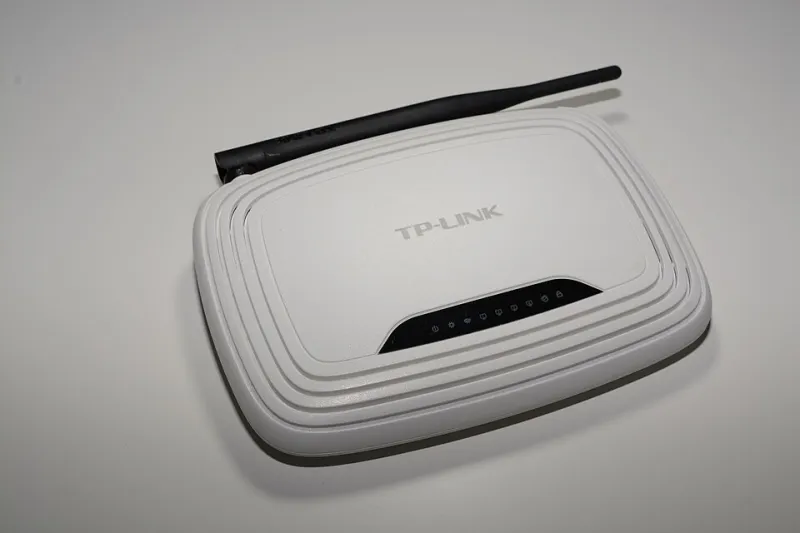
Photo: Hayden Schiff, CC BY 4.0, via Wikimedia Commons
Tucked behind the television, perched on a closet shelf, or wedged between the modem and the cable box, the home router is perhaps the most consequential piece of technology most Americans have never thought twice about. It was installed by a technician, connected once, and promptly ignored — a blinking box whose job is simply to work. That invisibility, it turns out, is precisely what makes it so valuable to attackers.
Security researchers and federal agencies alike have repeatedly flagged default router credentials as one of the most persistently exploited vulnerabilities in residential networks. Yet surveys consistently find that a significant majority of American households have never changed the username and password their router arrived with. For cybercriminals, that oversight is not a minor inconvenience to work around — it is an open invitation.
Why Default Credentials Exist, and Why They Never Go Away
Manufacturers assign default login credentials — typically something as rudimentary as admin/admin, admin/password, or a short alphanumeric string printed on the device's label — so that technicians and end users can access the router's administrative interface during setup. The logic is practical: a device with no accessible login is impossible to configure.
The problem is that the burden of changing those credentials has historically fallen on the consumer, and consumers have rarely been prompted to act. Internet service providers often prioritize a frictionless installation experience over security hygiene, and the routers they lease or sell frequently ship with documentation that never emphasizes — let alone requires — a credential change.
Compounding the issue is the widespread availability of default credential databases. Websites and repositories cataloging the factory-set usernames and passwords for virtually every consumer router model are freely accessible online. An attacker does not need to guess: they need only identify the router's make and model, a piece of information that is often discoverable through network scanning tools, and then consult a lookup table.
The Anatomy of a Router Compromise
Gaining administrative access to a router is rarely the end goal in itself. It is the beginning of a chain of exploitation that can extend far beyond the router's own settings.
Once inside the administrative interface, an attacker can alter the router's DNS settings — redirecting every device on the network to malicious servers without any individual device being touched. A household member who types their bank's web address into a browser may be silently delivered to a convincing counterfeit page designed to harvest login credentials. This technique, known as DNS hijacking, is particularly insidious because it operates beneath the awareness of most security software installed on individual computers or phones.
Beyond DNS manipulation, a compromised router can be recruited into a botnet — a network of hijacked devices used to conduct distributed denial-of-service attacks, distribute spam, or facilitate credential-stuffing campaigns against major platforms. In this scenario, the malicious activity originates from the victim's own IP address, a fact that can create serious legal and reputational complications for the household.
Attackers may also use the router as a pivot point for lateral movement — scanning the internal network for connected devices, including smart home hardware, networked storage drives, security cameras, and computers, and probing each for additional vulnerabilities. A router compromise, in this sense, is not a breach of one device. It is a breach of the entire ecosystem that device governs.
Persistence: The Advantage That Makes Router Exploits Especially Dangerous
What distinguishes router-based intrusions from many other forms of cyberattack is persistence. Because routers are rarely rebooted, rarely monitored, and almost never subjected to antivirus scanning, an attacker who establishes access can maintain that foothold for an extended period — sometimes years — without detection.
Modified firmware, altered DNS configurations, and rogue administrative accounts can survive routine troubleshooting steps that would eliminate malware on a conventional computer. Unless the router is fully reset to factory defaults and properly reconfigured, the compromise endures.
The FBI issued guidance on this threat as far back as 2018, following a large-scale router infection campaign attributed to a state-sponsored threat actor. The agency's advisory recommended that Americans reboot their routers and change default credentials — a measure that underscores how broadly this vulnerability is recognized at the federal level, even as consumer awareness remains limited.
Scanning from the Outside: How Attackers Find Vulnerable Routers at Scale
It would be a mistake to assume that router exploitation requires targeted, manual effort. Automated scanning tools allow attackers to probe millions of IP addresses in a matter of hours, identifying devices with open administrative interfaces and testing them against known default credential lists. The process is largely passive and highly scalable.
Residential routers with remote management enabled — a setting that exposes the administrative interface to the public internet — are particularly exposed. Many routers ship with remote management disabled by default, but some ISPs enable it for their own support purposes, and others are configured with it active by end users who never revisit the setting.
The scale of this scanning activity means that an unprotected router does not need to belong to a high-value target to be compromised. Opportunistic attackers are not selecting victims; they are harvesting whatever is available.
Securing the Device You Forgot You Had
The remediation steps for this vulnerability are neither technically complex nor time-consuming. What they require is deliberate attention to a device most households treat as infrastructure rather than a security asset.
Change the administrative credentials immediately. Access your router's administrative interface — typically reachable by typing 192.168.1.1 or 192.168.0.1 into a browser address bar — and replace the default username and password with strong, unique alternatives. A passphrase of at least twelve characters, combining letters, numbers, and symbols, is appropriate. This password should not be reused anywhere else.
Update the router's firmware. Manufacturers periodically release firmware updates that patch known vulnerabilities. Many modern routers support automatic updates, but older models require manual installation through the administrative interface. If your router's firmware has not been updated in over a year, treat that as an urgent priority.
Disable remote management unless it is explicitly necessary. Unless you have a specific, well-understood reason to access your router's administrative panel from outside your home network, this feature should be off.
Audit connected devices periodically. Your router's administrative interface will typically display a list of all devices currently connected to the network. Review this list for any device you do not recognize. An unfamiliar device may indicate unauthorized access or an unsecured smart home gadget that warrants attention.
Consider a router replacement if your device is outdated. Routers more than five years old may no longer receive firmware updates from their manufacturers, leaving them permanently exposed to vulnerabilities that will never be patched. If your router falls into this category, replacement is a more reliable solution than continued maintenance.
The Broader Lesson
The router's obscurity has long been its greatest liability. Because it functions quietly and reliably — because it never demands attention the way a slow computer or a crashing application does — it escapes the security scrutiny that most other connected devices receive. That invisibility is a feature attackers understand and exploit with regularity.
In a household where sensitive financial transactions, medical records, personal communications, and an expanding array of smart devices all traverse the same network, the router is not peripheral infrastructure. It is the foundation on which every other layer of digital security either stands or falls. Treating it accordingly — beginning with something as simple as changing a four-year-old factory password — is among the highest-value security actions available to any American household.